
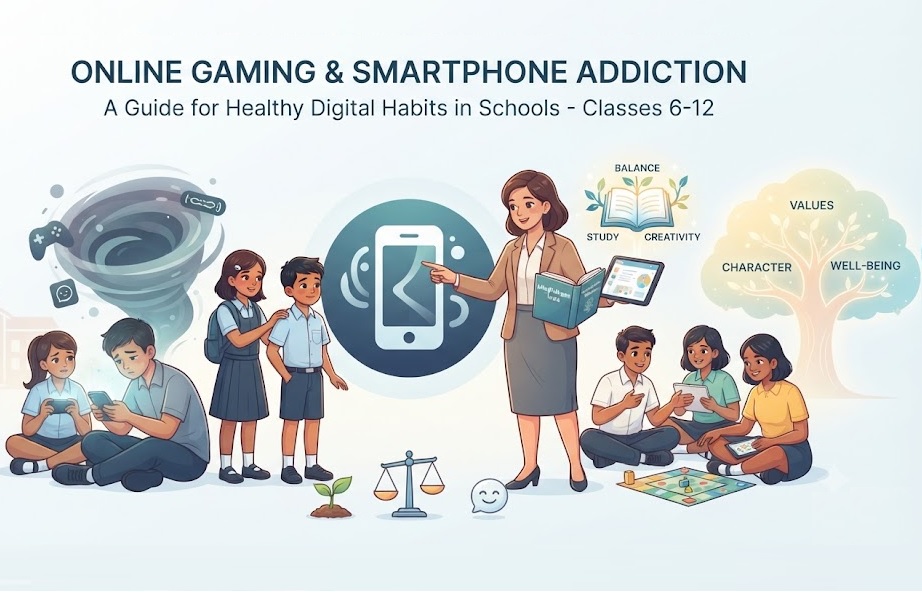
Online Gaming & Smartphone Addiction

Online Gaming & Smartphone Addiction

Technology has changed the way we learn, play, and connect with friends. Smartphones and online games can be fun, educational, and entertaining. They help us stay in touch with family, learn new skills, solve puzzles, and even improve creativity.

But what happens when “just five more minutes” turns into several hours every day?

For many students, excessive gaming and smartphone use can affect studies, sleep, health, friendships, and happiness. The good news is that with the right habits, you can enjoy technology without letting it control your life.

This guide explains everything Class 6 to 12 students, parents, and teachers should know about online gaming and smartphone addiction.

What Is Online Gaming & Smartphone Addiction?

Online gaming or smartphone addiction doesn’t mean you simply enjoy using your phone.

It becomes a problem when you:

    • Cannot stop playing or scrolling.
    • Feel restless or angry without your phone.
    • Ignore homework and studies.
    • Stay awake late every night.
    • Spend less time with family and friends.
    • Think about games or social media all day.

Technology should be a tool that helps you—not something that controls your daily life.

Why Are Online Games So Addictive?

Game developers spend years designing games that keep players interested.

Many games include:

    • Daily rewards
    • Bonus points
    • New levels
    • Special events
    • Leaderboards
    • Unlockable characters
    • Achievement badges
    • Surprise rewards
    • Multiplayer competitions

These features make players want to come back again and again.

That doesn’t mean games are “bad.” It simply means you need to know when to stop.

Why Smartphones Are Hard to Put Down

Smartphones constantly compete for your attention.

Every notification, message, like, or video encourages you to check your phone “just once.”

Soon:

One minute becomes ten.

Ten minutes become an hour.

Before you realize it, half the evening is gone.

Signs of Smartphone or Gaming Addiction

Ask yourself honestly.

Do you:

    • Check your phone immediately after waking up?
    • Spend several hours gaming every day?
    • Feel upset when someone asks you to stop?
    • Skip homework because of games?
    • Lose track of time while scrolling?
    • Think about games even during class?
    • Use your phone during meals?
    • Stay awake late using your phone?

If you answered “Yes” to several questions, it may be time to improve your digital habits.

How Too Much Screen Time Affects Your Health

Eye Problems

Looking at screens for long periods can cause:

    • Dry eyes
    • Blurred vision
    • Eye strain
    • Headaches

Following the 20-20-20 rule can help.

Every 20 minutes, look at something about 20 feet away for 20 seconds.

Poor Sleep

Using phones before bedtime is one of the biggest causes of poor sleep among teenagers.

The bright light from screens can make it harder for your brain to prepare for sleep.

Poor sleep can lead to:

    • Tiredness
    • Poor memory
    • Difficulty concentrating
    • Irritability
    • Lower academic performance

Less Physical Activity

Many students spend hours sitting while gaming.

This means:

    • Less exercise
    • Weight gain
    • Poor posture
    • Neck pain
    • Back pain

Even 30–60 minutes of outdoor play every day can make a big difference.

How Gaming Affects Your Brain

Your brain loves rewards.

Whenever you win a game, unlock a level, or receive points, your brain feels excited.

This is one reason games are so enjoyable.

However, spending too much time chasing these rewards may make it harder to enjoy everyday activities like reading, sports, or family time.

Balance is important.

Effects on Studies

Students who spend excessive time gaming often experience:

    • Poor concentration
    • Incomplete homework
    • Last-minute studying
    • Lower grades
    • Less interest in reading
    • Reduced classroom participation

Remember:

Every hour spent wisely today builds your future tomorrow.

Effects on Mental Health

Excessive smartphone use may increase feelings of:

    • Stress
    • Anxiety
    • Loneliness
    • Irritability
    • Mood swings

Social media can also make students compare themselves with others, leading to lower self-confidence.

Always remember:

People usually share only their best moments online—not their everyday struggles.

Effects on Friendships

Online friends can be enjoyable.

But real-life friendships are different.

Talking face-to-face, playing sports together, laughing, and helping each other create stronger and healthier relationships.

Don’t let screens replace real conversations.

Online Safety Every Student Must Know

Not everyone online is who they claim to be.

Never:

    • Share your home address.
    • Share passwords.
    • Share OTPs.
    • Share school details.
    • Send personal photos to strangers.
    • Meet online friends without informing your parents.

If someone makes you uncomfortable online, block them and tell a trusted adult immediately.

Beware of In-Game Purchases

Many games encourage players to buy:

    • Coins
    • Gems
    • Skins
    • Battle passes
    • Loot boxes
    • Power-ups

These small purchases can quickly become expensive.

Always ask your parents before spending money online.

What Does Science Say?

Research has found that excessive recreational screen time is linked with poorer sleep, reduced physical activity, and difficulties with attention in many children and teenagers.

The World Health Organization (WHO) also recognizes Gaming Disorder as a health condition when gaming becomes so excessive that it causes significant problems in daily life. This applies to a small number of people but highlights the importance of maintaining healthy gaming habits.

How Much Screen Time Is Healthy?

There isn’t one perfect number that suits everyone.

Instead, ask yourself:

    • Am I finishing my homework?
    • Am I sleeping well?
    • Am I exercising?
    • Am I spending time with family?
    • Am I enjoying hobbies beyond my phone?

If the answer is “Yes,” your digital life is likely in good balance.

Healthy Digital Habits Every Student Should Follow

Finish Important Work First

Complete homework before gaming.

It feels much better to play after your responsibilities are finished.

Create Screen-Free Time

Keep your phone away:

    • During meals
    • During study time
    • Before bedtime
    • During family conversations

Small habits make a big difference.

Enjoy Offline Activities

Try:

    • Reading
    • Cricket
    • Football
    • Badminton
    • Cycling
    • Drawing
    • Music
    • Dance
    • Gardening
    • Photography

The real world has many adventures waiting for you.

Sleep on Time

Aim for enough sleep every night.

A well-rested brain learns faster, remembers better, and feels happier.


What Should You Do If a Friend Is Addicted?

Don’t laugh or tease them.

Instead:

    • Talk kindly.
    • Invite them to play outside.
    • Encourage healthy habits.
    • Tell a trusted teacher or parent if you’re worried.

Sometimes a caring friend can make all the difference.

Tips for Parents

Parents can help by:

    • Setting reasonable screen-time rules.
    • Being good role models.
    • Encouraging outdoor games.
    • Having regular family conversations.
    • Keeping phones away during meals.
    • Avoiding punishment-only approaches.
    • Appreciating healthy digital habits.

Support works better than constant criticism.

Tips for Teachers

Teachers can help students by:

    • Discussing digital well-being in class.
    • Encouraging sports and extracurricular activities.
    • Teaching cyber safety.
    • Recognizing warning signs early.
    • Working closely with parents.
    • Creating awareness without fear.

Schools play an important role in helping students develop responsible digital habits.

Frequently Asked Questions (FAQs)

Is online gaming always bad?

No. Many games improve problem-solving, teamwork, creativity, and strategic thinking. Problems arise only when gaming begins affecting studies, sleep, health, or relationships.

How do I know if I use my phone too much?

If you cannot stop using it, neglect important responsibilities, or feel anxious without it, it’s time to reassess your habits.

Can smartphone addiction be reduced?

Yes. Setting time limits, keeping phones away during study and sleep, spending time outdoors, and enjoying offline hobbies can all help.

Should parents ban gaming completely?

Usually no. A balanced approach with clear rules, open communication, and age-appropriate limits is more effective than a complete ban.

My Thoughts

Technology is one of the greatest inventions of our time. It helps us learn, explore, communicate, and create. But like any powerful tool, it should be used wisely.

Your phone is meant to help you achieve your dreams—not distract you from them.

So the next time you pick up your phone, ask yourself one simple question:

“Am I using my phone… or is my phone using me?”

Remember this simple message:

Play games. Learn new things. Stay connected. But never let a screen become more important than your health, family, friends, and future.

Related Topics

Bullying & Cyberbullying

Smoking, Vaping, Alcohol & Drugs

Mental Health, Anxiety & Depression

Internet Safety & Social Media Safety

Self-Esteem, Confidence & Body Image

Exam Stress & Time Management

Peer Pressure

Respect, Kindness & Inclusion

Managing Anger & Emotions

About the Author

Nidhi Mehta is the founder of IndiaTutor.in and a professional online educator with over 11 years of teaching experience. She specializes in tutoring Classes 1 to 6 across core academic subjects, with a strong focus on concept clarity and foundational skill-building. Her teaching approach is based on personalized, one-to-one learning that helps students develop long-term academic confidence and understanding.
Visit her profile    Visit About Us Page

Internet Safety & Social Media Safety

Internet Safety & Social Media Safety

The internet has transformed the way children learn, communicate, and explore the world. Students use online resources for school assignments, educational videos, virtual classes, and connecting with friends. While the internet offers incredible opportunities, it also brings risks that every student, parent, and teacher should understand.

Learning how to stay safe online is now as important as learning road safety or personal hygiene. By developing good digital habits, children can enjoy the benefits of technology while avoiding many common dangers.

According to UNICEF, one in three internet users worldwide is a child. Studies also show that teenagers spend several hours online every day, making internet safety an essential life skill rather than an optional lesson.

Why Internet Safety Matters

The internet allows students to access information instantly, but not everything online is safe or trustworthy.

Children may encounter:

    • Cyberbullying
    • Online scams
    • Fake news
    • Inappropriate content
    • Identity theft
    • Privacy violations
    • Online predators
    • Gaming fraud
    • Harmful social media challenges

Teaching children how to recognize these risks helps them make better decisions and protects their emotional well-being.

Benefits of the Internet for Students

When used wisely, the internet offers many educational advantages.

Students can:

    • Learn from educational websites
    • Attend online tuition classes
    • Watch science experiments and tutorials
    • Practice coding and mathematics
    • Improve language skills
    • Participate in virtual competitions
    • Connect with teachers worldwide

The goal is not to avoid technology but to use it responsibly.

Understanding Social Media

Social media platforms help people share ideas, photos, videos, and messages.

Popular platforms include Instagram, YouTube, Snapchat, Facebook, WhatsApp, Discord, and X.

Many children begin using social media before reaching the recommended minimum age, often without understanding privacy settings or online risks.

A child’s digital footprint begins the moment something is shared online.

What Is a Digital Footprint?

Every photo, comment, video, message, or account created online leaves a digital footprint.

Even deleted content may remain stored on servers or screenshots taken by others.

Before posting anything, students should ask themselves:

    • Would I be comfortable if my parents saw this?
    • Could this affect my future?
    • Would I be happy if this appeared years later?

Good online choices today can protect future education and career opportunities.

Common Internet Risks for Students

Cyberbullying

Cyberbullying happens when someone repeatedly hurts another person using digital devices.

Examples include:

    • Sending abusive messages
    • Sharing embarrassing photos
    • Posting rumours
    • Excluding classmates from online groups
    • Creating fake profiles

Research from UNESCO indicates that cyberbullying affects millions of students worldwide and can lead to anxiety, depression, lower academic performance, and reduced self-confidence.

Students should never respond aggressively. Instead, they should save evidence, block the offender, and report the incident to trusted adults.

Online Strangers

Not everyone online is who they claim to be.

Some people pretend to be children to gain trust.

Students should never:

    • Share their address
    • Reveal school details
    • Send personal photographs
    • Meet online friends without parental knowledge
    • Share family information

Parents should encourage open conversations rather than creating fear.

Phishing and Online Scams

Cybercriminals often send fake emails, messages, or links pretending to be trusted companies.

Their goal is to steal:

    • Passwords
    • Bank details
    • OTPs
    • Personal information

Students should avoid clicking suspicious links and always verify websites before entering any information.

Fake News

Not everything online is true.

Images, videos, and articles can be edited or created using artificial intelligence.

Students should compare information from reliable educational sources before believing or sharing it.

Social Media Safety Tips

Protect Personal Information

Avoid posting:

    • Home address
    • Phone number
    • School location
    • Daily routine
    • Travel plans
    • Financial information

Privacy settings should be reviewed regularly.

Think Before You Share

Photos and comments can spread quickly.

Ask yourself:

    • Is this respectful?
    • Could someone misunderstand it?
    • Could it embarrass me or someone else?

A few seconds of thinking can prevent long-term problems.

Use Strong Passwords

A strong password should include:

    • Uppercase letters
    • Lowercase letters
    • Numbers
    • Special characters

Never share passwords with friends.

Enable two-factor authentication whenever available.

Accept Friend Requests Carefully

Students should only connect with people they know personally.

Fake accounts often use attractive profile pictures and friendly messages to gain trust.

Limit Screen Time

Too much screen time may affect:

    • Sleep
    • Concentration
    • Physical activity
    • Eye health
    • Emotional well-being

Experts recommend balancing online activities with outdoor games, reading, hobbies, and family time.

Safe Online Learning Habits

Online education has become common across schools.

Students should:

    • Attend classes from quiet places
    • Keep cameras off if instructed for privacy
    • Avoid sharing meeting links
    • Join only official classrooms
    • Use school-approved platforms
    • Log out after completing lessons

Teachers should also educate students about digital etiquette during virtual classes.

Gaming Safety

Online games can improve problem-solving skills and teamwork.

However, students should be cautious about:

    • Talking to strangers
    • Buying virtual items without permission
    • Downloading cheats
    • Sharing gaming accounts
    • Spending excessive time playing

Parents should understand the games children play and discuss safe behaviour instead of banning gaming completely.

The Role of Parents

Parents remain the strongest influence on children’s online behaviour.

Helpful practices include:

Create Family Rules

Agree on:

    • Daily screen time
    • Safe websites
    • Social media limits
    • Device-free family time
    • Bedtime without phones

Keep Communication Open

Children should feel comfortable discussing uncomfortable online experiences without fear of punishment.

Many problems become serious simply because children are afraid to tell adults.

Learn Together

Technology changes quickly.

Parents do not need to know everything.

Learning together builds trust and improves digital awareness for the whole family.

The Role of Teachers

Schools play an important role in digital citizenship education.

Teachers can:

    • Discuss internet safety regularly
    • Demonstrate safe online behaviour
    • Teach fact-checking skills
    • Encourage respectful communication
    • Explain copyright and plagiarism
    • Promote responsible use of artificial intelligence

Digital literacy is becoming as important as reading and writing.

Warning Signs That a Child May Need Help

Parents and teachers should notice sudden changes such as:

    • Avoiding devices after receiving messages
    • Becoming secretive online
    • Loss of confidence
    • Mood swings
    • Declining school performance
    • Fear of checking notifications
    • Withdrawal from friends

Early support can prevent long-term emotional harm.

Interesting Internet Safety Facts

Children Spend Significant Time Online

Global studies suggest many teenagers spend between 4 and 7 hours daily using digital devices outside schoolwork.

Billions Use Social Media

More than five billion people worldwide use social media, making digital safety a universal concern.

Weak Passwords Remain Common

Many cyberattacks succeed because users choose simple passwords that are easy to guess.

Digital Skills Are Future Skills

Employers increasingly value digital responsibility alongside academic qualifications.

Practical Internet Safety Checklist

Before going online, remember these simple rules:

    • Think before posting.
    • Protect your personal information.
    • Never share passwords.
    • Verify information before believing it.
    • Report bullying immediately.
    • Block suspicious users.
    • Respect others online.
    • Use strong privacy settings.
    • Balance online and offline activities.
    • Ask a trusted adult whenever something feels wrong.

My Thoughts

The internet is one of the greatest educational tools ever created, but like every powerful tool, it must be used responsibly.

Students who develop safe online habits today will become confident digital citizens tomorrow. Parents and teachers should work together to create an environment where children feel supported, informed, and protected.

Internet safety is not about restricting opportunities. It is about giving young people the knowledge and confidence to make smart decisions every time they go online.

By encouraging respectful communication, protecting personal information, recognizing online risks, and staying informed about changing technology, families and schools can ensure that the internet remains a place for learning, creativity, and positive growth.

Related Topics

Bullying & Cyberbullying

Smoking, Vaping, Alcohol & Drugs

Mental Health, Anxiety & Depression

Self-Esteem, Confidence & Body Image

Exam Stress & Time Management

Peer Pressure

Respect, Kindness & Inclusion

Online Gaming & Smartphone Addiction 

Managing Anger & Emotions

About the Author

Nidhi Mehta is the founder of IndiaTutor.in and a professional online educator with over 11 years of teaching experience. She specializes in tutoring Classes 1 to 6 across core academic subjects, with a strong focus on concept clarity and foundational skill-building. Her teaching approach is based on personalized, one-to-one learning that helps students develop long-term academic confidence and understanding.

Visit her profile    Visit About Us Page

error: Content is protected !!

Found this helpful? Share it in 2 seconds!

Link copied to clipboard